Everything you need to know about CNC technology — from how it works and the types of machines available, to G-code programming, real-world applications, and what’s new in 2026.
Table of Contents
- What Is CNC Machining?
- How CNC Machines Work
- Types of CNC Machines
- G-Code & Programming Basics
- Materials Used in CNC Machining
- Real-World Applications
- Advantages & Limitations
- CNC Trends in 2026
- Getting Started with CNC
- Conclusion
What Is CNC Machining?
Computer Numerical Control (CNC) machining is a manufacturing process in which pre-programmed computer software dictates the movement of factory tools and machinery. The technology enables the automated control of machining tools — such as drills, lathes, mills, and routers — with extreme precision that would be impossible to consistently achieve through manual operation.
The term “numerical control” refers to the use of numerical data to guide machine tools along multiple axes. A CNC machine interprets a set of instructions — known as G-code — and translates them into precise physical movements, cutting or shaping raw material into a finished part according to the design specifications.
📌 Key Concept
CNC is fundamentally the bridge between digital design and physical manufacturing. A part designed in CAD (Computer-Aided Design) software can be translated into machining instructions and reproduced identically thousands of times — with tolerances as tight as ±0.001 mm on high-end machines.
CNC machining evolved from older NC (Numerical Control) technology developed in the 1940s and 1950s, which used punched tape to control machine movement. The introduction of dedicated microcomputers in the 1970s led to “Computer Numerical Control,” dramatically expanding what machines could do and how they could be programmed.
§ // 02 — How CNC Machines Work
How CNC Machines Work
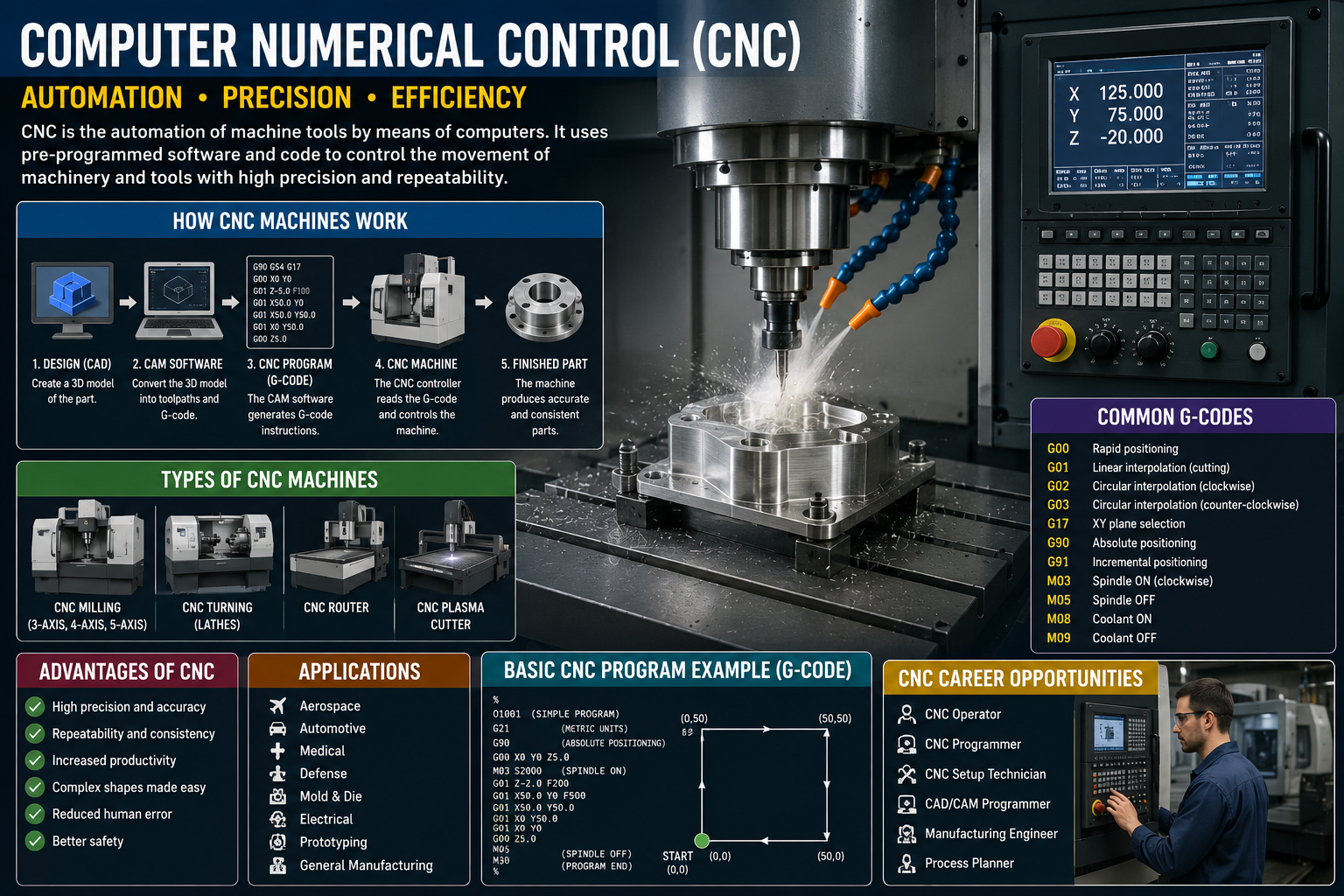
A CNC machine operates through a tightly integrated workflow that connects digital design to physical output. Understanding this workflow helps clarify why CNC is so powerful and why it has become standard across manufacturing industries worldwide.
The CNC Workflow
Step 1 — CAD Design: A part is first designed using Computer-Aided Design (CAD) software such as AutoCAD, SolidWorks, or Fusion 360. The designer creates a precise 2D drawing or 3D model of the part with exact dimensions and tolerances.
Step 2 — CAM Processing: The CAD file is then imported into Computer-Aided Manufacturing (CAM) software. The CAM program analyzes the geometry of the part and generates the toolpaths — the specific paths the cutting tool must travel to produce the part. It also selects appropriate cutting parameters like feed rate, spindle speed, and depth of cut.
Step 3 — G-Code Generation: The CAM software outputs a G-code file — a text-based program containing a series of commands that the CNC machine’s controller can read and execute.
Step 4 — Machine Setup: An operator loads the raw material (called a “workpiece”) into the machine, installs the appropriate cutting tools, and performs any necessary calibration (such as setting the work origin).
Step 5 — Execution: The CNC controller reads the G-code and drives the machine’s servo motors or stepper motors to move the cutting tool and/or workpiece along the programmed axes with extreme precision. The machine removes material until the finished part is produced.
Step 6 — Inspection: The finished part is inspected using measuring tools — such as calipers, micrometers, or coordinate measuring machines (CMMs) — to verify it meets the required specifications.
Types of CNC Machines
CNC technology is used across a wide variety of machine types, each suited to different manufacturing tasks, materials, and levels of complexity.
| Machine Type | Primary Operation | Common Materials | Typical Applications |
|---|---|---|---|
| CNC Milling Machine | Rotary cutting tool removes material from stationary workpiece | Metal, plastic, wood | Complex 3D parts, aerospace components |
| CNC Lathe / Turning | Workpiece rotates; stationary tool cuts | Metal, plastic | Shafts, cylinders, screws, pipes |
| CNC Router | High-speed rotating bit cuts along programmed path | Wood, plastic, foam, soft metals | Furniture, signage, PCB milling |
| CNC Plasma Cutter | Ionized gas jet cuts through conductive materials | Steel, aluminum, copper | Metal fabrication, structural parts |
| CNC Laser Cutter | High-power laser vaporizes or melts material | Metal, wood, acrylic, leather | Engraving, precision cutting, marking |
| CNC EDM | Electrical discharge erodes material | Hardened metals | Molds, dies, very hard alloys |
| CNC Waterjet | High-pressure water (with abrasive) cuts material | Almost any material | Stone, glass, titanium, composites |
| CNC Grinder | Abrasive wheel grinds surface to fine finish | Metal | Tool sharpening, precision surface finish |
Understanding Axes
CNC machines are often described by how many axes of movement they offer. A standard 3-axis machine moves along X, Y, and Z (left-right, front-back, up-down). A 5-axis machine adds two rotational axes, allowing the cutting tool to approach the workpiece from virtually any angle — enabling complex geometries in a single setup. High-end machines can have 6 or more axes.
G-Code & Programming Basics
G-code (also called RS-274) is the standardized programming language used to control CNC machines. Each line of G-code is an instruction that tells the machine what to do — where to move, how fast to move, when to start or stop the spindle, and much more.
Common G-Code Commands
// Sample CNC G-Code Program (Basic Milling Example); Program: Simple pocket cut ; Material: Aluminum 6061 ; Tool: 6mm End Mill G21 ; Set units to millimeters G90 ; Absolute positioning mode G28 G91 Z0 ; Home Z axis T01 M06 ; Select Tool 1, tool change S8000 M03 ; Spindle ON, 8000 RPM clockwise G00 X0 Y0 Z5 ; Rapid move to start position G01 Z-1 F200 ; Feed down 1mm at 200 mm/min G01 X50 F500 ; Cut 50mm in X direction G01 Y30 ; Cut 30mm in Y direction G01 X0 ; Return in X direction G01 Y0 ; Return in Y direction G00 Z50 ; Retract Z axis M05 ; Spindle OFF M30 ; End of program
Key G-Code Prefixes
G-codes control motion and machine state (e.g., G00 = rapid move, G01 = linear feed, G02/G03 = circular motion). M-codes control miscellaneous machine functions (e.g., M03 = spindle on, M08 = coolant on, M30 = end of program). Modern CNC machines also support subprograms, variables, and conditional logic, making G-code capable of expressing complex machining cycles.
💡 Did You Know
Most professional machinists today rarely write G-code by hand. CAM software auto-generates G-code from 3D models in seconds. However, understanding G-code is still essential for editing, troubleshooting, and optimizing programs on the shop floor.
Materials Used in CNC Machining
One of the great strengths of CNC machining is its versatility across a wide range of materials. The choice of material affects tooling selection, cutting parameters, surface finish, and overall part quality.
Metals
Metals are the most common CNC machining materials. Aluminum (especially 6061 and 7075) is the most frequently machined metal due to its excellent machinability, light weight, and strength. Steel — including mild steel, stainless steel, and tool steel — is widely used where strength and hardness are critical. Titanium is valued in aerospace and medical applications for its strength-to-weight ratio. Brass and copper are chosen for electrical components and decorative parts.
Plastics
Engineering plastics such as ABS, Nylon, Delrin (POM), PEEK, and Polycarbonate are commonly CNC machined for prototypes, functional components, and medical devices. Plastics require lower cutting speeds and careful chip management to avoid heat buildup and melting.
Composites & Other Materials
Carbon fiber reinforced polymers (CFRP) and fiberglass are machined for aerospace and sporting goods. Wood, foam, and rigid foam are routed for furniture, signage, and molds. Even stone and glass can be CNC machined using specialized waterjet or grinding processes.
Real-World Applications of CNC
CNC machining is not confined to one sector — it is a foundational technology that underpins production across virtually every major industry.
Aerospace & Defense
Aerospace is one of the most demanding CNC applications. Turbine blades, structural airframe components, landing gear parts, and engine housings require extreme precision and are often made from difficult-to-machine materials like titanium and high-temperature alloys. 5-axis CNC milling is standard in this sector.
Medical & Healthcare
CNC machining produces surgical instruments, orthopedic implants (hip and knee replacements), dental prosthetics, and diagnostic device housings. Biocompatible materials like surgical-grade stainless steel, titanium, and PEEK are commonly used, and tolerances are extremely tight.
Automotive
Engine components, transmission parts, brake calipers, custom wheels, and suspension components are all CNC machined. Both prototype development and high-volume production rely on CNC technology in the automotive world.
Electronics
CNC routers are used to mill printed circuit board (PCB) prototypes. CNC machining also produces heatsinks, connector housings, enclosures, and precision mechanical parts for electronics devices.
Architecture & Art
CNC routers and laser cutters have opened up new creative possibilities in architecture, interior design, and fine art — enabling the production of intricate decorative panels, custom furniture joints, large-format sculptures, and detailed models.
Advantages & Limitations
Advantages
- Exceptional precision and repeatability
- 24/7 unattended operation capability
- Consistent quality across high-volume runs
- Wide range of compatible materials
- Complex geometries achievable (5-axis)
- Reduced human error vs. manual machining
- Easy design changes via software updates
- Scalable from prototype to mass production
Limitations
- High initial machine and setup costs
- Skilled programming knowledge required
- Not cost-effective for very simple parts
- Material waste (subtractive process)
- Setup time can offset gains for one-offs
- Tool wear requires monitoring and replacement
- Some geometries require multiple setups
CNC Trends in 2026
The CNC industry continues to evolve rapidly. Several key trends are reshaping how machines are built, programmed, and operated in 2026.
AI-Assisted CAM & Toolpath Optimization
Artificial intelligence is now integrated into leading CAM platforms, enabling automated toolpath generation, real-time feed rate optimization, and predictive tool wear monitoring. AI-driven machining can reduce cycle times by 20–40% while extending tool life significantly.
CNC + Additive Hybrid Machines
Hybrid machines that combine CNC subtractive machining with metal additive manufacturing (3D printing) in a single setup are gaining traction. These systems allow material to be deposited and then precisely machined in a single pass, enabling complex internal channels and geometries that were previously impossible.
Digital Twins & Simulation
Full digital twin environments now allow manufacturers to simulate entire CNC machining processes in software before cutting a single part. Collision detection, material removal simulation, and process optimization happen virtually, significantly reducing trial-and-error and scrap rates.
IoT-Connected Smart Machines
Modern CNC machines are increasingly networked via Industrial IoT (IIoT), feeding real-time data — spindle load, vibration, temperature, cycle count — into centralized dashboards. Predictive maintenance systems use this data to schedule servicing before failures occur, maximizing uptime.
Collaborative Robotics (Cobots)
Lightweight collaborative robots are being integrated with CNC machines for automated part loading/unloading, reducing the need for manual labor during repetitive production runs. Cobots make lights-out manufacturing accessible to smaller shops that cannot afford full industrial automation.
Democratization of CNC
Desktop and benchtop CNC routers and mills — once limited to hobbyists — have reached a level of precision and capability that makes them viable for small-batch professional production. Combined with affordable CAM software subscriptions and online machining services, access to CNC technology has never been broader.
Getting Started with CNC
Whether you are a student, hobbyist, or professional looking to build CNC skills, the learning path is more accessible than ever in 2026.
Learning Resources
Online platforms such as Coursera, Udemy, and LinkedIn Learning offer CNC programming courses ranging from beginner G-code fundamentals to advanced 5-axis CAM programming. Many machine tool manufacturers — Haas, FANUC, and Mazak among them — provide free training academies and simulation software.
Recommended Software for Beginners
Fusion 360 (Autodesk) offers integrated CAD and CAM in a single environment with a free tier for personal use — an excellent starting point. FreeCAD with the Path workbench is a fully open-source alternative. For routers and hobby machines, Carbide Create and Easel offer very low barriers to entry.
Entry-Level Hardware
Hobby CNC routers from brands like Shapeoko, X-Carve, and Longmill provide a practical hands-on introduction to CNC at a relatively low cost. For metal cutting, benchtop mills from Bantam Tools or Haas Mini Mill simulators offer a step up in capability and rigidity.
🎓 Tip for Beginners
Start with CAD/CAM software simulation before touching any real hardware. Understanding how toolpaths are generated and visualizing material removal in software first will prevent costly mistakes and dangerous situations on real machines.
CNC Remains the Backbone of Modern Manufacturing
From the first numerically controlled machines of the 1950s to today’s AI-integrated, IoT-connected machining centers, CNC technology has continuously evolved to meet the demands of modern manufacturing. It remains the fundamental link between digital design and physical production across virtually every industry on Earth.
In 2026, CNC is more accessible, more intelligent, and more capable than ever before. Whether you are a manufacturer looking to increase throughput, an engineer designing the next aerospace component, or a maker exploring fabrication for the first time — understanding CNC is an investment that pays lasting dividends.
Quick Stats
Global CNC Market (2026)~$115B
Typical Tolerance (3-axis)±0.025 mm
High-end Tolerance±0.001 mm
Common Max Axes5-axis
Industry Growth Rate~7.4% CAGR
G-code StandardISO 6983
Glossary
CADComputer-Aided Design — digital design software CAMComputer-Aided Manufacturing — toolpath generation G-codeThe programming language of CNC machines WorkpieceThe raw material being machined Feed RateSpeed at which tool moves through material SpindleThe rotating component holding the cutting tool FixtureDevice used to hold a workpiece in place ToleranceAcceptable dimensional deviation range CMMCoordinate Measuring Machine for inspection EDMElectrical Discharge Machining
Related Articles
→ Introduction to CAD/CAM Software in 2026
→ 3D Printing vs CNC Machining: Which to Choose?
→ Automation & Robotics in Smart Factories
→ Materials Science for Engineers: A Primer
© 2026 TechnologyHub · All content is for informational purposes only · malikhamzaayub123@gmail.com